How Beenli Works

A simple rhythm that helps kids learn effort, honesty, and saving.

Beenli isn't about assigned chores or scheduled allowances. Kids choose the work they're ready for, report it with a tap, and parents turn those efforts into honey during friendly Payday conversations.

The rhythm in detail

Beenli works in a simple loop: kids log their work, parents approve it during Payday, and Honey accumulates in jars. But the magic is in the details — the small design choices that make it work for families with young kids, busy schedules, and real-world chaos.

Set up your hive

One-time setup

Set up your hive

The foundation that makes everything else easy

What you do

Create accounts for each child and define tasks with values.

Why this matters

  • Icons instead of words

    Young kids who can't read yet can still recognize "the rabbit icon" means feeding the rabbits, and they are the "bird icon". No reading required.

  • Sounds for feedback

    Each task and each kid gets their own sound. Tap the dog icon, hear a bark. Tap your daughter's avatar, hear her laugh. It makes logging fun and confirms they chose the right thing.

  • Task pricing creates teaching moments

    Sitting down as parents to decide "is cleaning the cat's litter box worth 50 cents or $1?" forces you to think through what's fair, what's realistic for your budget, and what teaches the right lessons about effort.

  • Set it and forget it

    With kids accounts defined, and tasks set up, you rarely need to return to this section of the app again — once it's set up, you just use it.

What problem this solves

No more lost lists on the fridge. No more disagreements about what tasks are worth. Everything is defined once, remembered forever, and easy to adjust as your family grows.

Pro tips

  • Keep task names short (3 words max) — "Feed rabbits," not "Go outside and put fresh food and water in the rabbit hutch"
  • Choose icons that are visually distinct — avoid having 3 similar-looking animal icons
  • Start with 5–8 tasks, not 20 — you can always add more later
  • Set values you can actually afford if kids complete everything (you'd be surprised how motivated they get)
  • Don't need to see a task to Shovel Snow in the summer? Just disable it and it will be hidden from the Tell Beenli screen
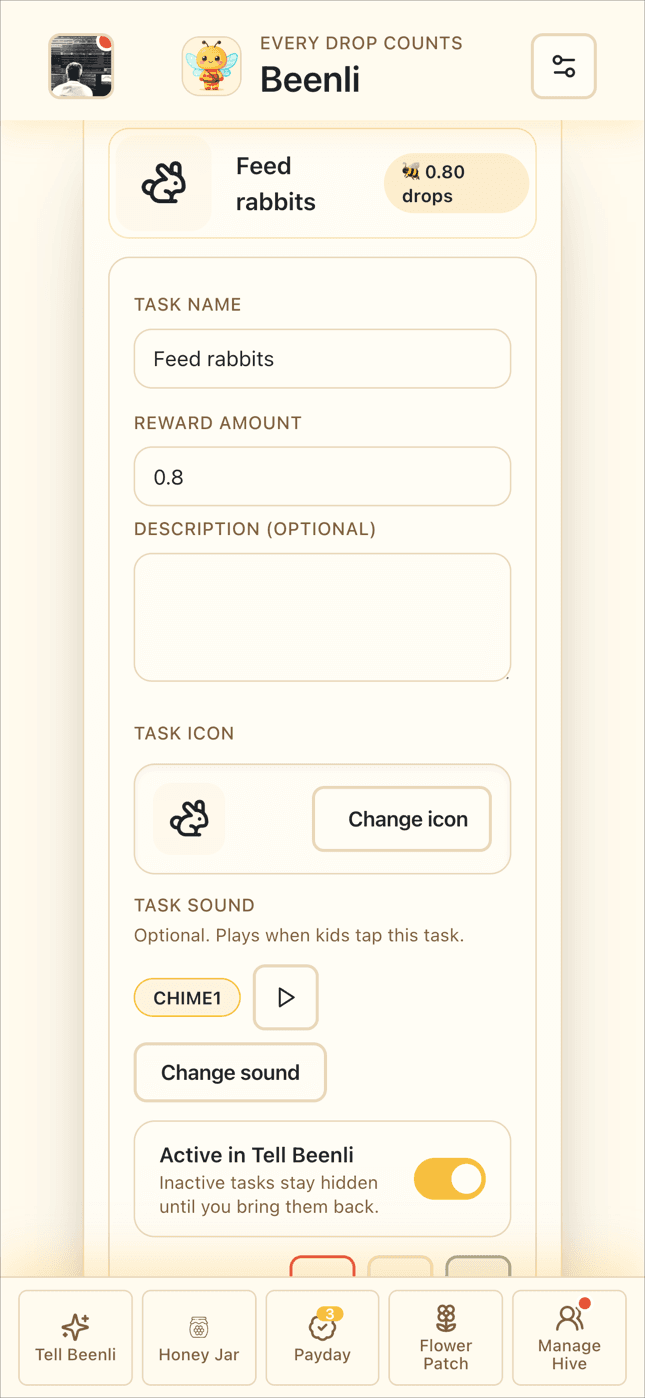
Task management setup screen
Kids do the work

When they're ready

Kids do the work

Real chores, real contribution, on their own terms

What happens

Kids see see a list of what can be done, decide they want to do it, and just... do it. No assignments. No nagging. No star charts on the fridge. They sweep the floor, feed the dog, or wipe the table because they know what's possible and they're motivated.

Why this matters

  • Builds intrinsic motivation

    When kids choose the work instead of being assigned it, they take ownership. It's their decision, their effort, their reward.

  • They connect effort to outcomes

    Kids start thinking: "I want that toy at the store. What can I do right now to earn toward it?" They're learning to be proactive, not passive.

  • Contributing to the hive feels good

    Kids aren't doing chores because they have to. They're helping because they're part of a family that works together. That mindset shift is powerful.

  • Parents don't have to be the task master

    You're not the enforcer anymore. You're not reminding, bribing, or threatening. Kids know what needs doing. You just... let them.

What problem this solves

The eternal battle of "Can you please clean your room?" "I'll do it later." "No, do it now." When kids have skin in the game and can see what tasks earn, they become self-starters.

Task list view
Kids tell Beenli

After they finish

Kids tell Beenli

Reporting work becomes fun, not a chore

What you do

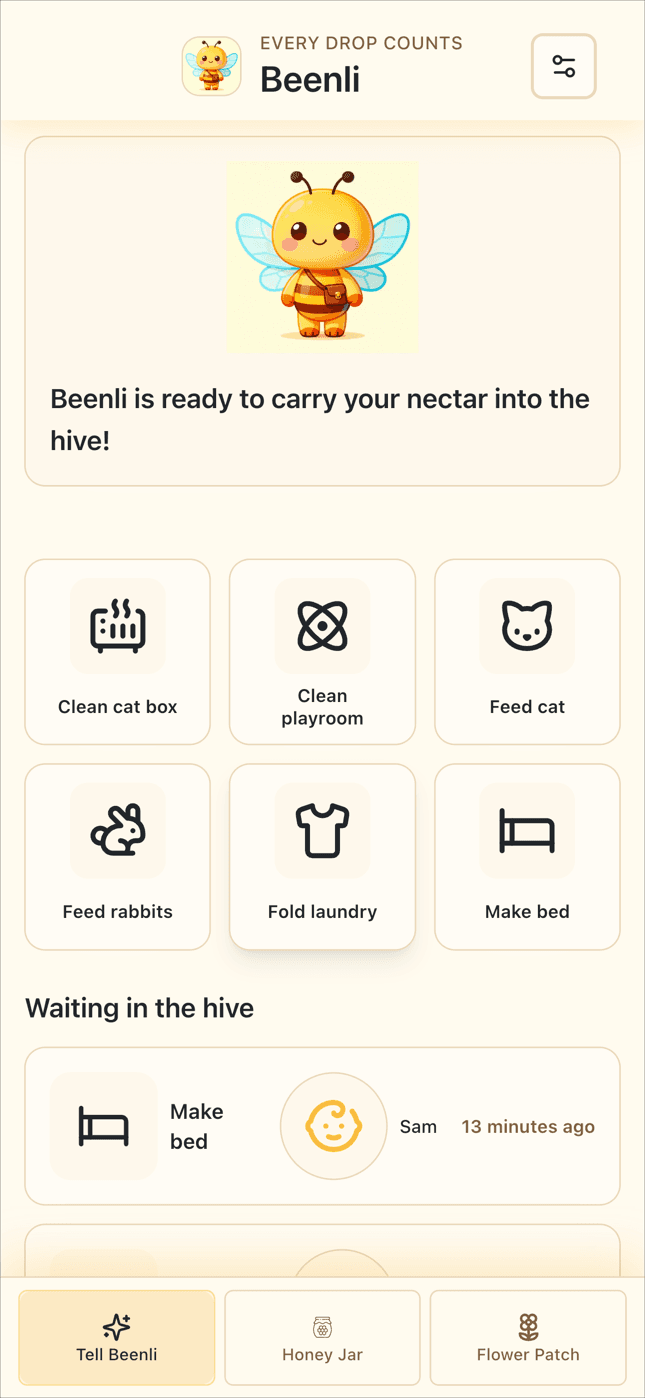
You do nothing! Kids open the app (no login needed), tap "Tell Beenli," find the task they completed, tap their avatar, and enjoy the little celebration.

Why this matters

  • No passwords or logins for kids

    The app is always ready. They don't need to remember anything except "tap the app, find my task, tap my face."

  • Instant feedback

    Beenli takes flight with fun sounds and animations that make telling Beenli feel rewarding even before they get paid. It's Pavlovian in the best way.

  • Visible effort

    Their completed tasks pile up in a list, creating a visual record of their contribution. They can see "I did 7 things today!"

  • No nagging required

    Once kids connect work-to-reward, "I want that toy → I need money → I can log tasks → I get paid," they self-motivate.

What problem this solves

The old way: "Mom, I cleaned the cat's litter box, give me 50 cents." Now you're scrambling for coins. The new way: Kid logs it instantly, moves on, and you handle payment later when it's convenient.

The old way: "Mom, can you buy me that toy?" Now you're rolling your eyes thinking "money doesn't grow on trees!". The new way: "Mom, I have walked the dog, made my mbed, cleaned the table, and fed the cat. Can we do a Payday now? I have earned enough for a toy I want!"

Tell Beenli interface
Parents approve during Payday

Weekly (or whenever)

Parents approve during Payday

The conversation that keeps it honest

What you do

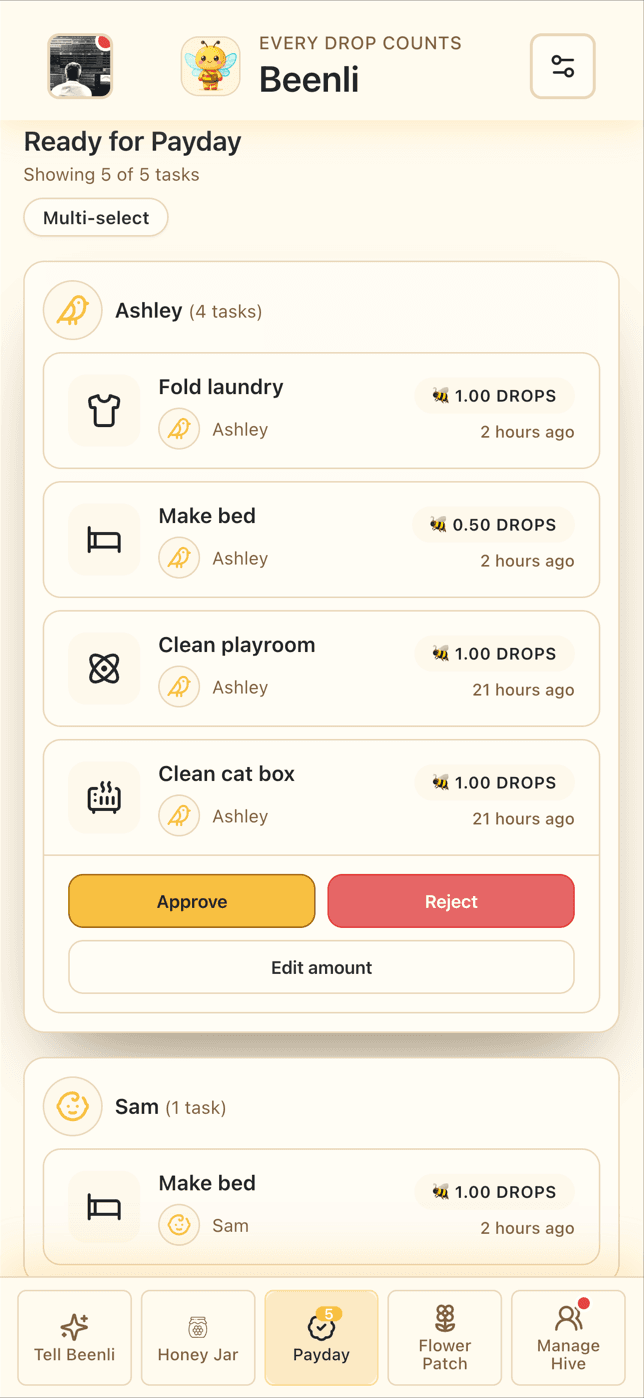
Open the Payday interface (in Parent Mode), review the list of completed tasks with your kid, approve or reject each one, and optionally add comments or make a one-time adjustment to the amount awarded.

Why this matters

  • Prevents accidental or mischievous logging

    If your kid logs "cleaned bathroom" 12 times in one day, you'll catch it here.

  • Creates conversation moments

    "Did you really empty the dishwasher three times today?" "Yes! Once after breakfast, once after lunch, and once after dinner." These little talks build accountability.

  • Parents stay in control

    You decide when Payday happens — daily, twice a week, whenever works. Flexible for busy schedules.

  • No cash changes hands

    You approve the work, the app credits their Honey Jar, and you handle real money only when they want to buy something.

What problem this solves

No more automatic allowance for work that didn't happen. No more arguments about whether they really did the chore. Payday creates a natural checkpoint where everyone reviews what actually got done.

Pro tips

  • Do Payday as a family event — let siblings see each other's work and celebrate together
  • If you reject a task, explain why (the app lets you add comments)
  • Don't let too many days pile up — weekly Payday keeps kids engaged
Payday review screen
Money grows (and gets spent)

Ongoing

Money grows (and gets spent)

Teaching digital money habits from day one

What you do

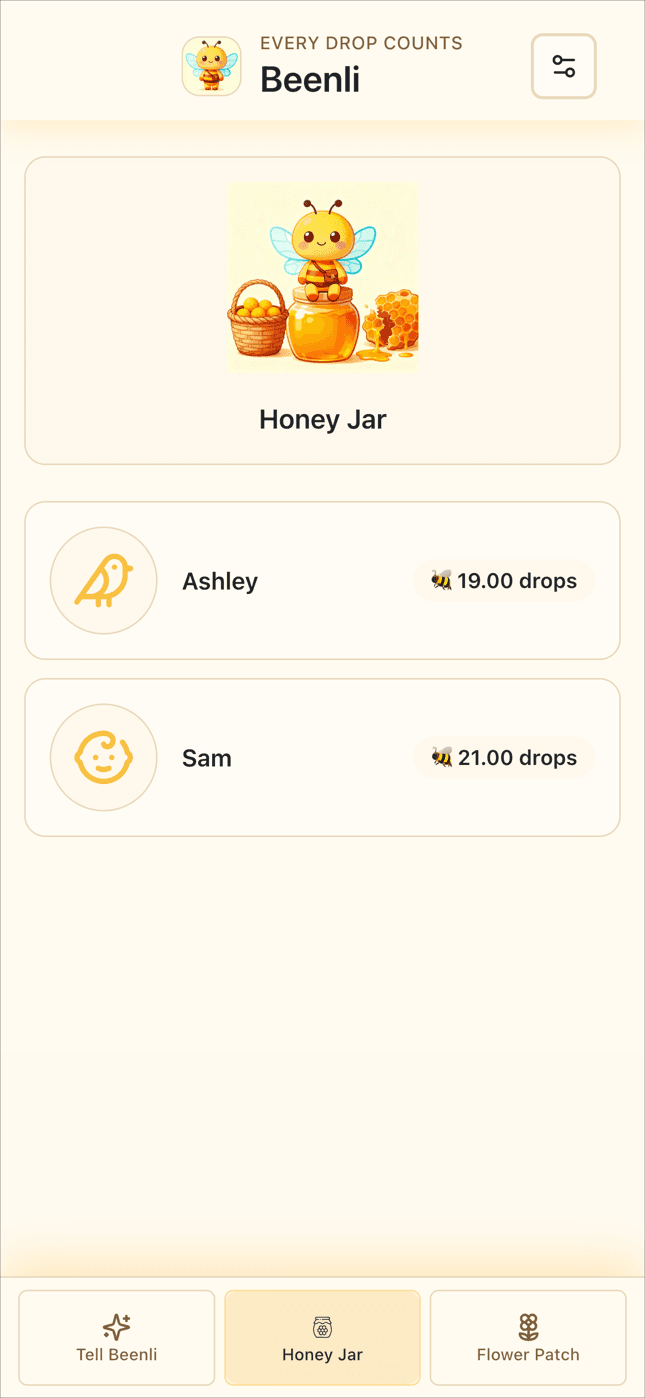
Kids check their Honey Jar balance anytime. When they want to buy something at the store, you quickly check their Honey Jar balance in Beenli. If they have enough, you buy it with your card (or however you normally pay). Then you do a withdrawal from their Honey Jar account when you get home (or even there on the spot).

Why this matters

  • Modern money habits

    Kids learn that money is tracked digitally, just like adult bank accounts. No more piggy banks with mystery balances.

  • Parents handle physical money

    You're not carrying coins. You're not worrying about lost cash. You buy everything normally, then reconcile later.

  • Real-world spending feels real

    When you withdraw $8 from their Honey Jar for that toy, they hear the "you just lost money" sound effect and see their balance drop. It stings a little — in a good teaching way.

  • Savings goals make waiting visible

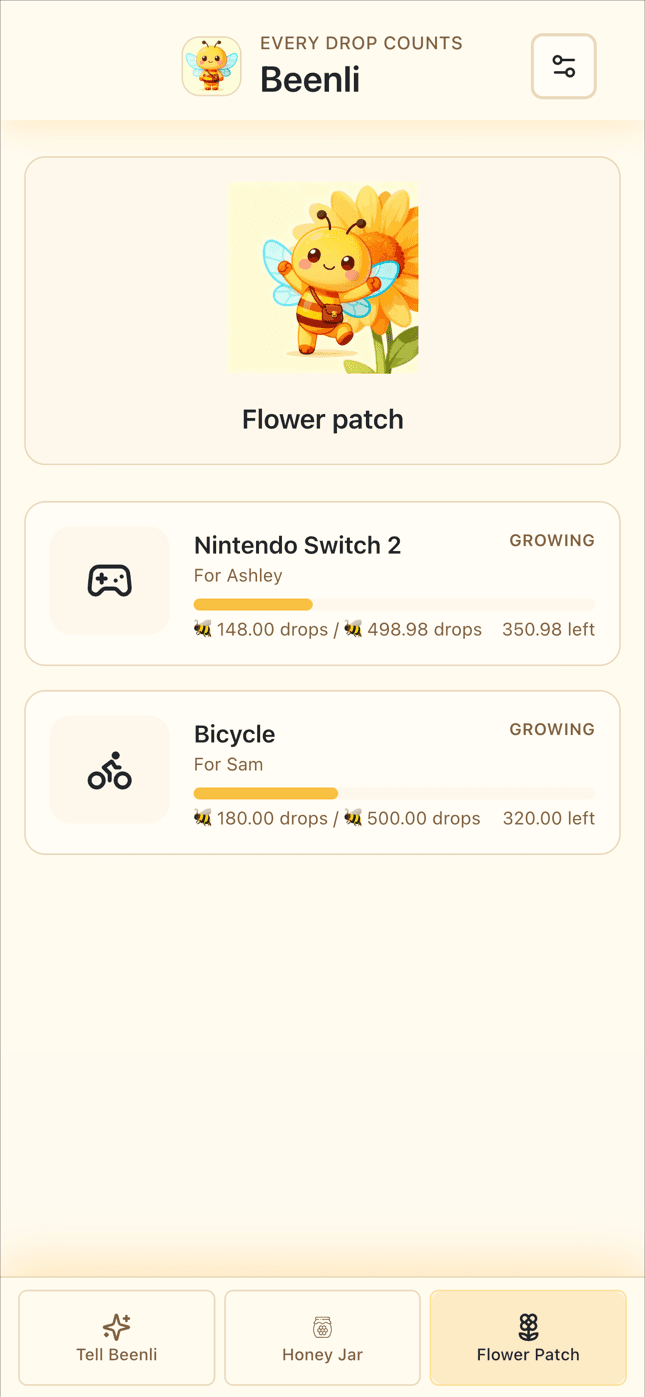
    If they're saving for something big, they can create a Flower Patch goal and transfer Honey into it. Watching it grow toward $50 or $100 teaches patience and delayed gratification.

What problem this solves

That checkout line moment where coins get rejected. Solved! That moment where you say "yes" to a purchase but forget to deduct it from their allowance. Solved!

That moment where they want something but their piggy bank is at home. Solved!.

That moment where they want something but their piggy bank is at home and nobody really knows how much is in it. Solved!

Honey Jar balance screen
The Flower Patch (savings goals)

Optional feature

The Flower Patch (savings goals)

Making long-term goals tangible

What it is

A separate savings bucket kids can transfer Honey into for big goals — a bike, a game system, a special trip.

Why it's powerful

  • Makes long-term goals visible

    "You've saved $47 of $150 for that gaming console" is way more motivating than "keep saving."

  • Teaches delayed gratification

    They see their Flower balance growing slowly, learning that big things take time and sustained effort.

  • Keeps spending money separate

    Honey Jar is for impulse purchases — literally their pocket money. Flower Patch is sacred — money goes in, but comes out only when the goal is reached.

What problem this solves

Kids want expensive things but get discouraged when saving feels endless. The Flower Patch makes progress visible and exciting, turning "I'll never save enough" into "I'm almost there!"

When kids see a big balance in their Honey Jar, they're more prone to frivolous spending.

Pro tips

  • Let kids pick their Flower Patch icon and name it. This makes it more personal.
  • Take a moment during Payday to ask about Flower Patch savings goals, and encourage them to put some of their recent gains towards a goal.
Flower Patch savings goals

Ready to start?

Bring Beenli to your hive

Join free during early access — no credit card required. Have questions? Email hello@beenli.com.